
Purpose
Assign or remove permissions for a Security Group by managing its Security Topics.
About Security Topics
Security Topics define the functional areas of the system that a Security Group can access. Each Security Topic contains individual Permissions for more granular control. By managing Security Topics, you determine what actions and data members of the Security Group are allowed to access.
Before you begin
-
You have access to the Cantara Administration Console.
-
You have permission to manage Security Groups.
Procedure
-
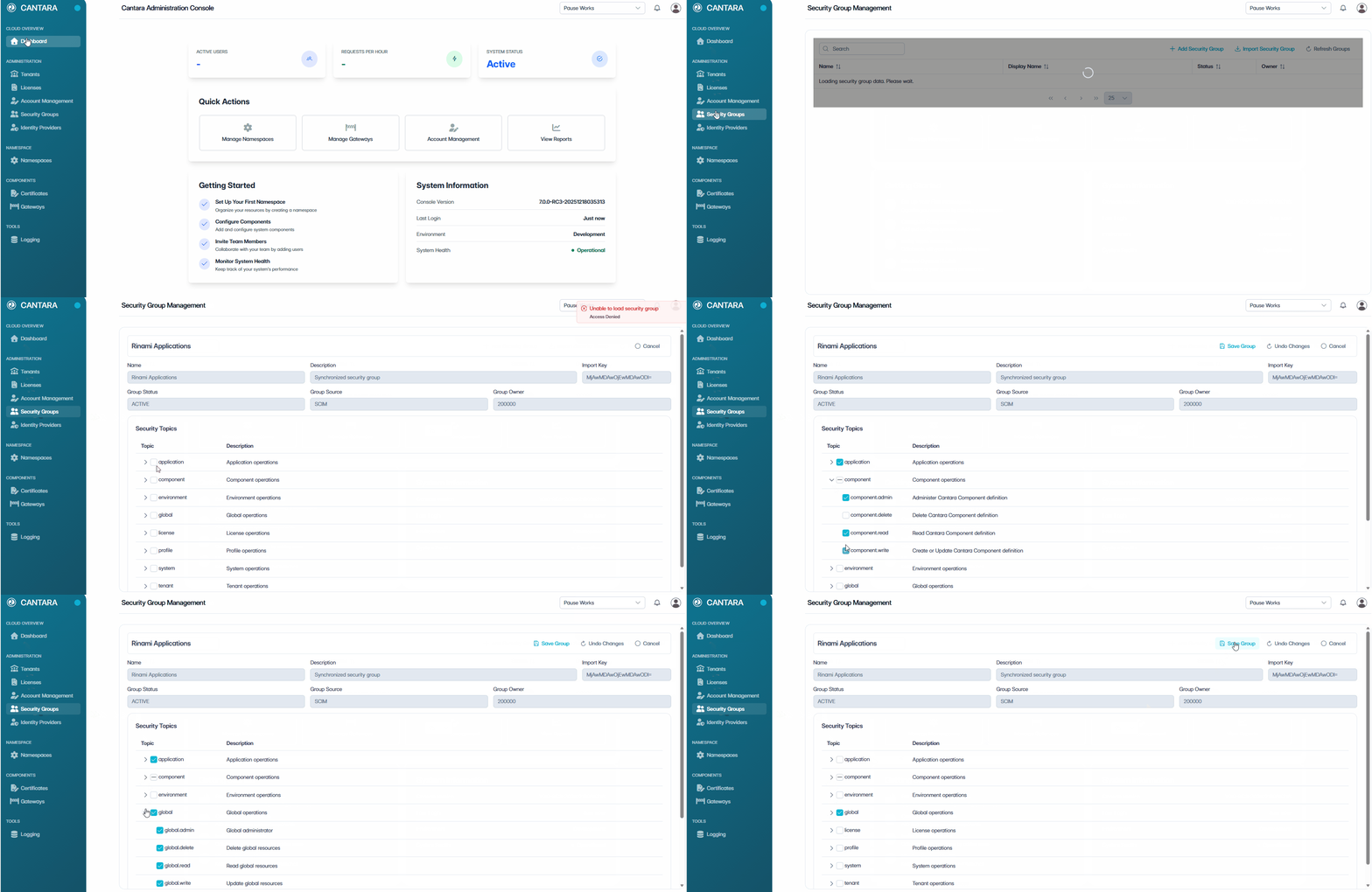
Navigate to Security Groups.
-
Select the Security Group you want to update.
-
In the Security Topics section, select or deselect Security Topics to manage access for the group:
-
Select a Security Topic to grant full access to that functional area, or deselect it to remove access.
-
Alternatively, expand a Security Topic (›) to view Permissions.
-
Select or deselect individual Permissions for granular control.
-
Repeat for additional Topics as required.
-
-
Select one of the following actions:
-
Save Group – Apply and save the updated Security Group.
-
Undo Changes – Revert any unsaved changes back to the last saved state.
-
Cancel – Exit without saving and return to the previous screen.
-
Changes to Security Topics take effect immediately for all members of the Security Group.