
Overview
This guide provides step-by-step instructions for setting up and managing your Cantara environment. It covers tenant creation, access control, namespace configuration, and gateway setup to ensure your platform is correctly structured, secure, and ready for use.
In this guide you will learn how to:
-
Register a Tenant – Set up and prepare your environment for use.
-
Manage Access Control – Ensure the right users have the correct permissions to keep your environment secure.
-
Configure Namespaces – Configure namespaces to isolate environments (e.g. development, testing, training) for independent configuration and management within a tenant.
-
Configure Gateways – Connect, route, and manage traffic efficiently across services.
-
Get Help – Know where to go when you need guidance or troubleshooting.
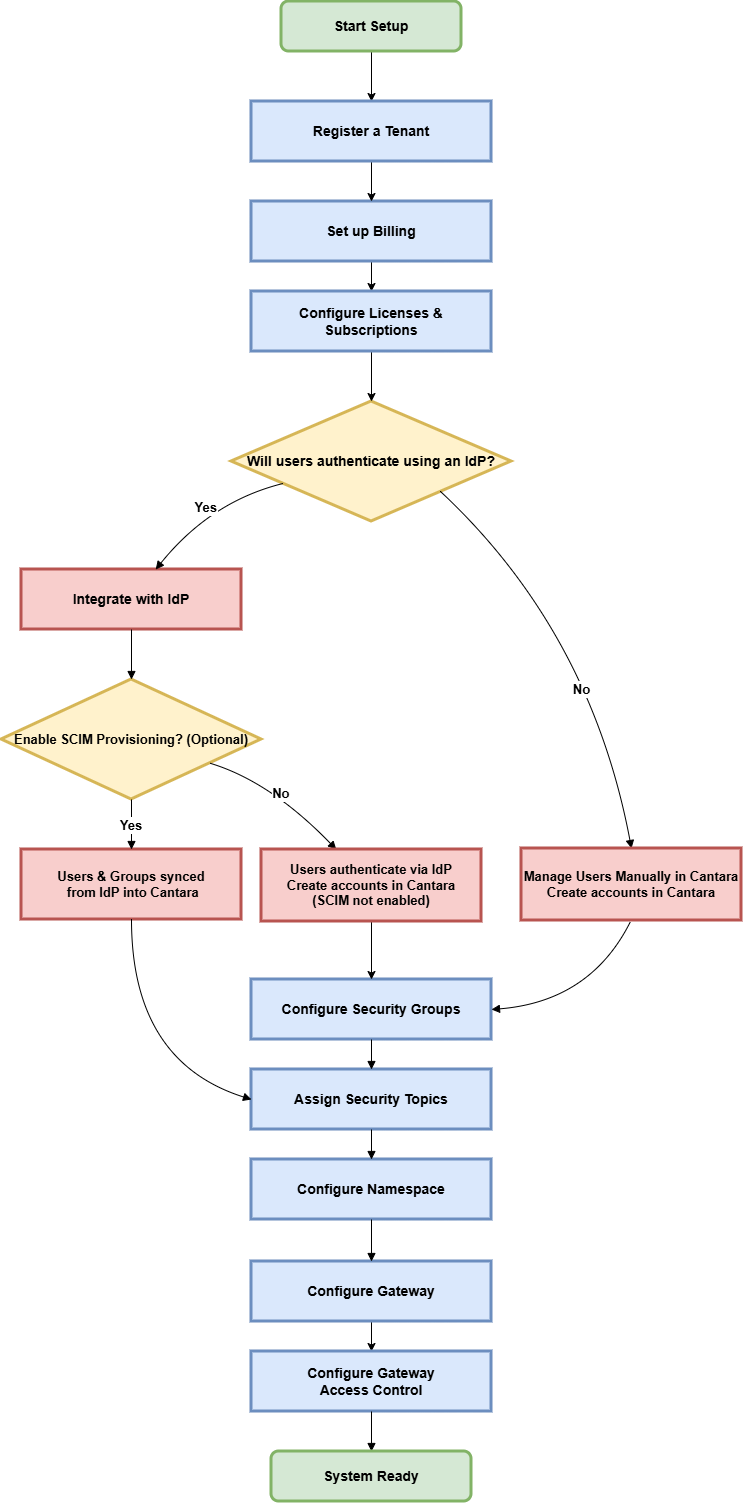
The following is the general workflow for setting up Cantara:
.png?cb=542d04510ecc98bf3ad394e877e785fd)
Getting Started
Before you begin, review the setup requirements and preparation details; see What to Expect.