
Purpose
View the details and configuration of an identity provider.
Before you begin
-
You have access to the Cantara Administration Console.
-
You have permission to view identity providers.
Procedure
To view an identity provider:
-
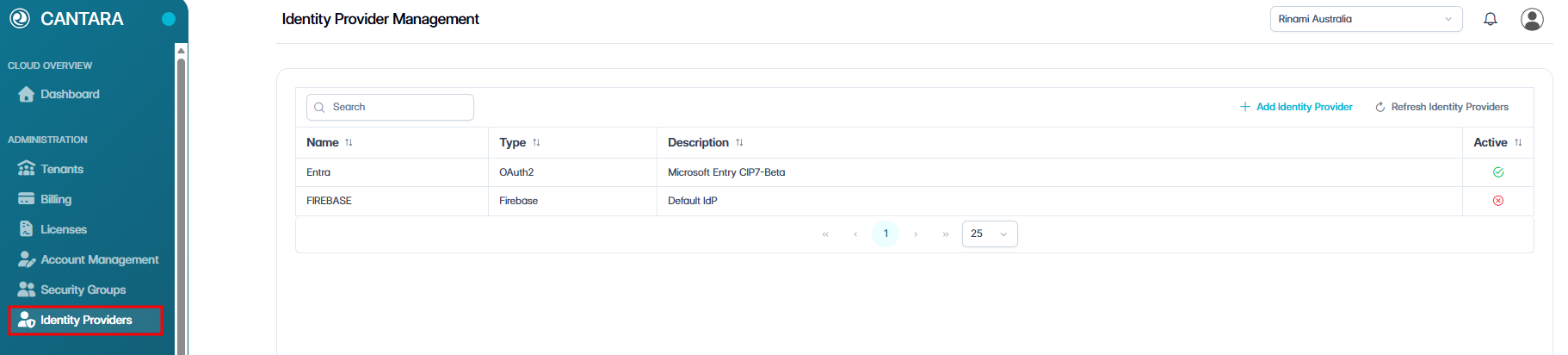
Navigate to Identity Providers.
The Identity Providers screen opens and displays the identity providers configured for your account. Each row represents one identity provider.
The following columns are displayed:
|
Column |
Description |
|---|---|
|
Name |
The name of the identity provider. |
|
Type |
The identity provider type. |
|
Description |
A description of the identity provider. |
|
Active |
The current status of the identity provider: Active or Inactive. |
-
Select the identity provider you want to view.
The details page for the selected identity provider is displayed with the following fields:
|
Field |
Description |
|---|---|
|
Name |
The name of the identity provider (read only). |
|
Identity Provider Type |
The type of identity provider (read only). |
|
Description |
A description of the identity provider. |
OAuth 2.0 Configuration
|
Field |
Description |
|---|---|
|
Authentication Method |
The authentication method used by the OAuth 2.0 provider. |
|
Client ID |
The unique client identifier for the OAuth 2.0 integration. |
|
Client Secret |
The secret key used to authenticate the client. |
|
Issuer URI |
The issuer URI for the OAuth 2.0 provider. |
|
Authentication URL |
The URL used to authenticate users with the provider (read only). |
|
Access Token URL |
The URL used to request access tokens from the provider (read only). |
|
User Info URL |
The URL used to retrieve user information from the provider (read only). |
|
Redirect URL |
The redirect URL used after authentication (read only). |
|
JSON Web Key Set URL |
The URL for the provider's JSON Web Key Set (read only). |
|
Secure JWKS URL |
The secure URL for the provider's JSON Web Key Set (read only). |
|
Logout URL |
The URL used to log users out of the provider (read only). |
|
Resource |
The resource identifier requested from the provider (read only). |
|
Audience |
The intended audience for issued tokens (read only). |
|
Username Attribute |
The attribute used as the user's username (read only). |
|
Display Name Attribute |
The attribute used as the user's display name (read only). |
|
Authorisation Grant Type |
The OAuth 2.0 authorisation grant type used by the provider (read only). |
|
Scopes (space or comma separated) |
The scopes requested from the provider, separated by spaces or commas (read only). |
|
Provider Display Name |
The display name shown for the provider (read only). |
|
PKCE Enabled |
Indicates whether Proof Key for Code Exchange (PKCE) is enabled (read only). |
SAML Configuration
|
Field |
Description |
|---|---|
|
Entity ID |
The entity ID for the SAML identity provider. |
|
Service Provider Entity ID |
The entity ID used by the service provider. |
|
IdP Identifier |
The identifier for the identity provider. |
|
Metadata URL |
The URL for the identity provider metadata. |
|
Login URL |
The URL used to log users in with the SAML provider. |
|
Logout URL |
The URL used to log users out of the SAML provider. |
|
Redirect URL |
The redirect URL used after authentication. |
|
Assertion Consumer Service Location |
The location where SAML assertions are received. |
|
Single Logout Service Location |
The location used for single logout requests. |
|
Registration ID |
The registration ID for the SAML provider configuration. |
|
Username Attribute |
The attribute used as the user's username. |
|
Display Name Attribute |
The attribute used as the user's display name. |
|
Sign Requests |
Indicates whether SAML requests are signed. |
|
Want Assertions Signed |
Indicates whether assertions from the identity provider must be signed. |
|
Signing Credential |
The credential used to sign SAML requests. |
|
Decryption Credential |
The credential used to decrypt SAML assertions. |
|
x509 Certificate |
The x509 certificate used for SAML verification. |
-
Select one of the following:
-
Save Identity Provider to save your changes.
-
Undo Changes to revert your edits.
-
Cancel to discard your changes and return to the identity providers list.
-