
Purpose
Delete a user account from the Cantara Administration Console.
If SCIM provisioning is configured, account deletion should be managed through the identity provider.
Before you begin
-
You have access to the Cantara Administration Console.
-
You have permission to manage accounts.
Procedure
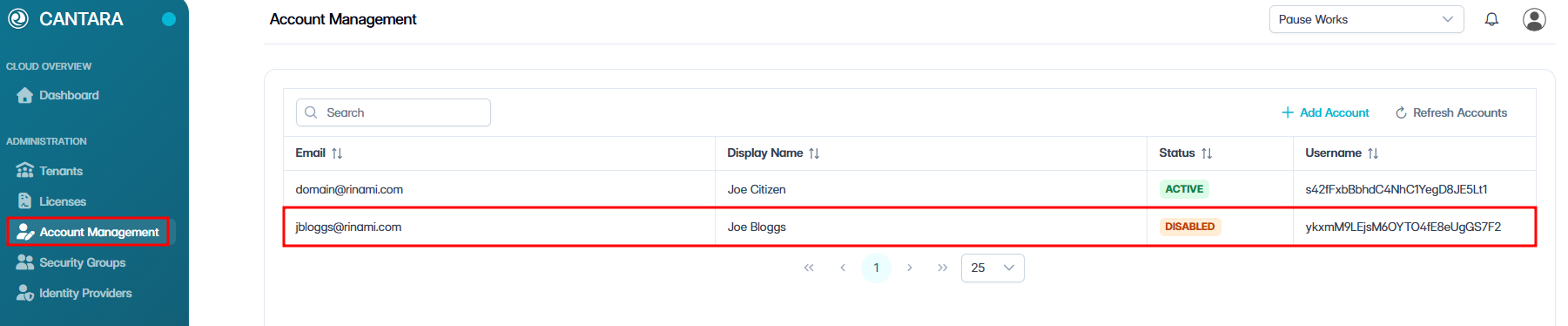
To delete a user account:
-
Navigate to Account Management.
The Account Management screen opens and displays the user accounts available to your account. Each row represents one user account. The following columns are displayed:
|
Column |
Description |
|---|---|
|
|
Email address for the account. |
|
Display Name |
The account name shown in the console. |
|
Status |
The current status of the account: Active or Disabled. |
|
Username |
Unique identifier for the user. |
-
Select the user account you want to delete.
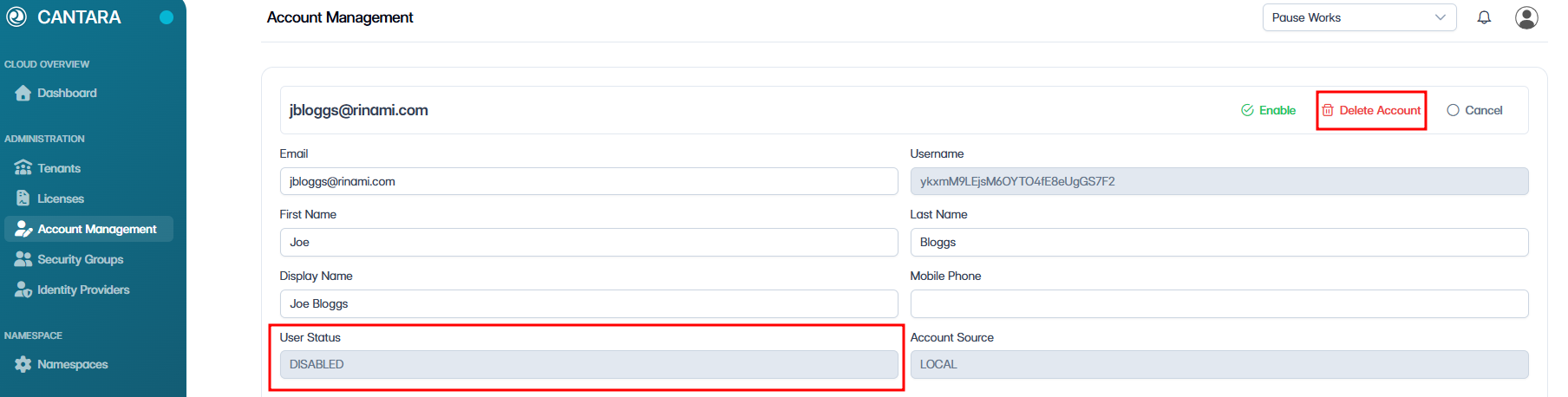
Warning: Deleting an account is permanent and cannot be undone. Ensure this account is no longer required before proceeding.
-
Ensure the account is disabled.
-
Click Delete Account.
-
Confirm the deletion when prompted.
The account is permanently removed from the system.