
Purpose
Use the Assignable Resources urces panel to review resources that can be assigned directly to work order operations.
NOTE: This panel is available only when Enable Assignments is selected under Branch Preferences.
Before you begin
Confirm that you have access to Resource Planning and that Enable Assignments is selected under Branch Preferences for the relevant branch.
Procedure
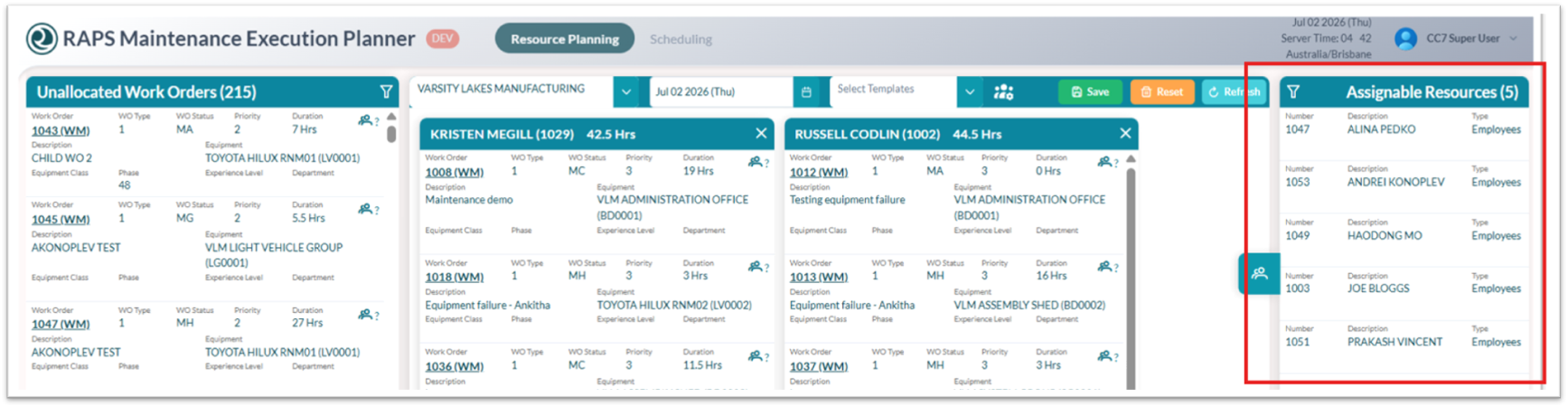
To view assignable resources:
-
Open Resource Planning.
-
Locate the Assignable Resources panel.
From here you can:
-
Review the list of resources available for assignment to work order operations.
-
Use filters to narrow the list by branch, template, resource type, or other available criteria.
-
Select the Assignable Resources icon to hide or display the panel.
-
Drag an assignable resource to a work order when you are ready to assign it to the related operation.