
Purpose
View billing information and invoices for a tenant in the Cantara Administration Console. Use this procedure to review the current billing profile and find invoices listed under the Account section.
Before you begin
-
You have access to the Cantara Administration Console.
-
You have permission to view billing information.
Procedure
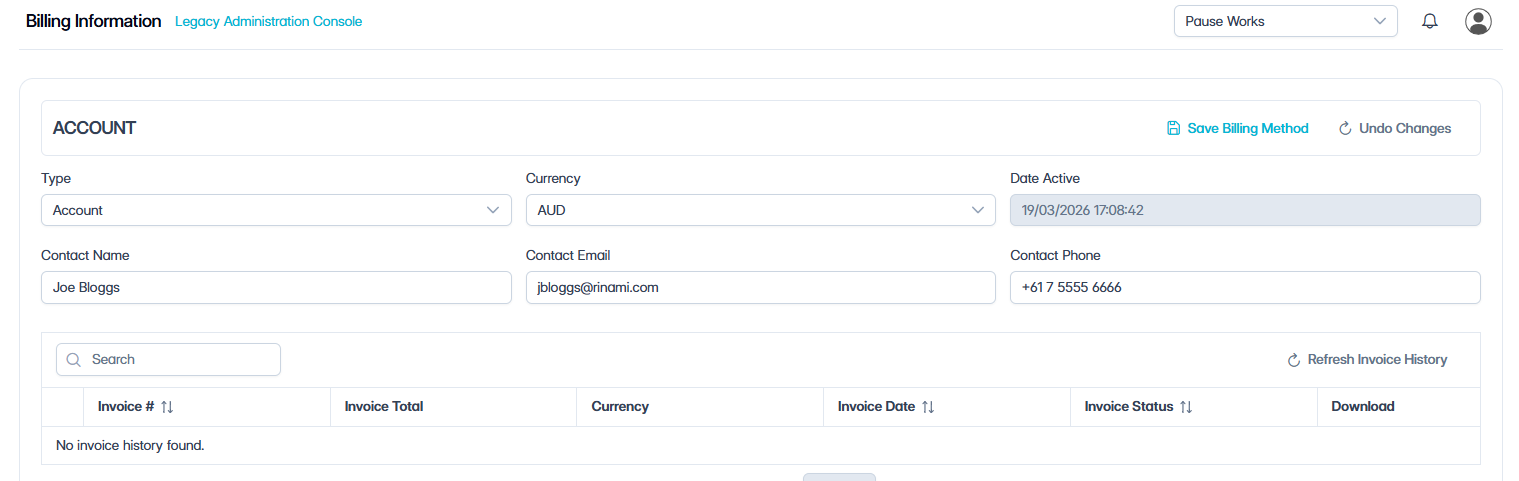
To view billing information and invoices:
-
Select Billing Information in the navigation panel.
-
Review the billing information displayed for the tenant, including the account type, currency, billing contact details, and payment card status.
-
Under Account, review the invoices listed in the table.
-
Search — Enter a keyword to filter the invoice list.
-
Sort — Select a column heading to sort the invoice list by Invoice No, Invoice Date, or Invoice Status.
-
Refresh — Reload the invoice list.
The invoice table includes the following details:
|
Column |
Description |
|---|---|
|
Invoice No |
The invoice number. |
|
Invoice Total |
The total amount for the invoice. |
|
Currency |
The currency used for the invoice. |
|
Invoice Date |
The date the invoice was issued. |
|
Invoice Status |
The current status of the invoice. |
|
Download |
Use this option to download the invoice. |