
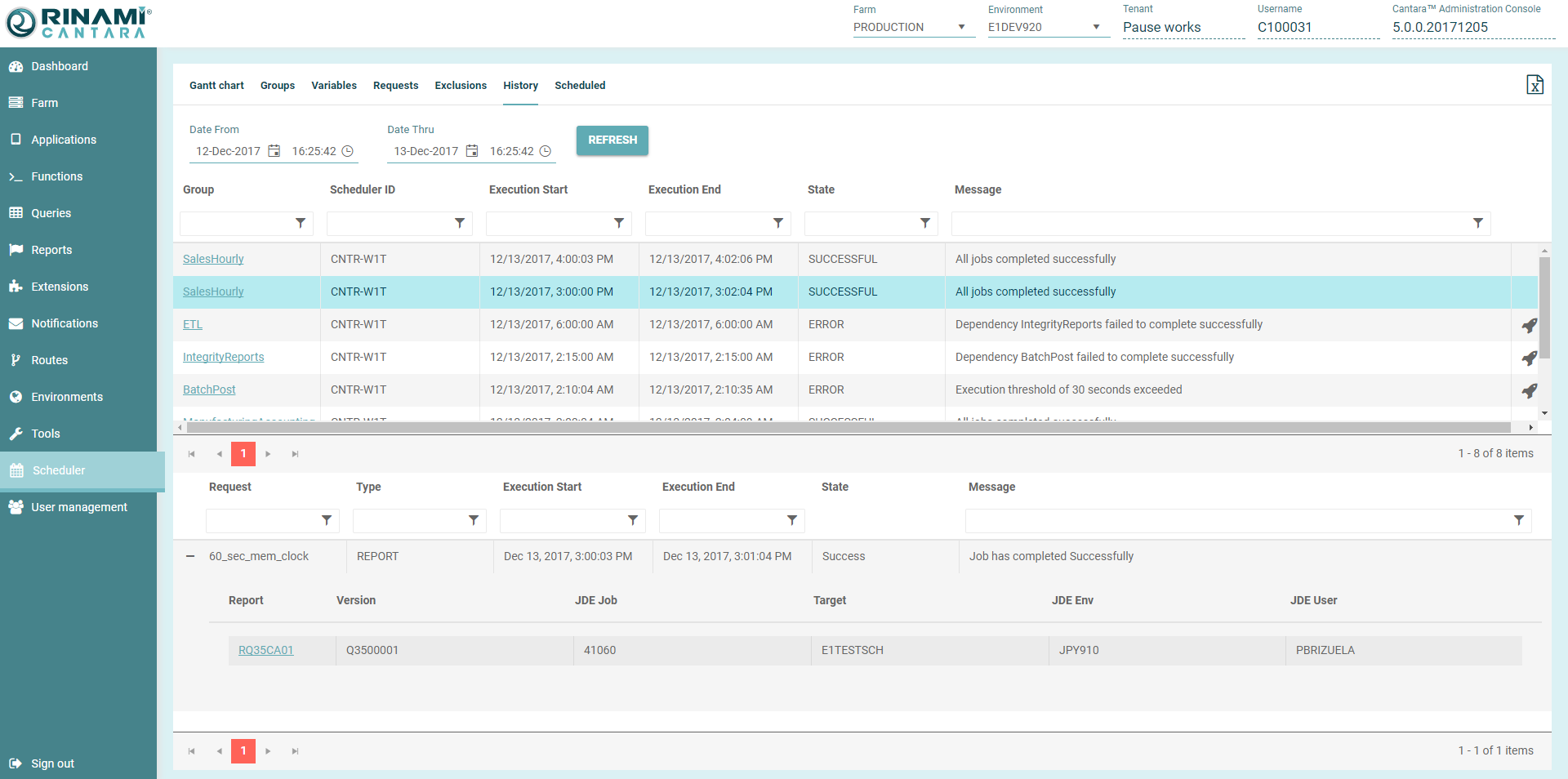
You can view of history of the jobs that have been submitted to the JD Edwards system.
History for submitted jobs includes the following:
-
Group - The name of the group
-
Scheduler ID - The ID of the Cantara instance that submitted the group.
-
Execution Start - Date and time the group was submitted to JDE
-
Execution End - Date and time the group completed
-
Status - The final status of the group
-
Message - Details about the jobs in the group
-
Resubmit - The option to resubmit groups that have completed in error.
To view job history
-
Click the Scheduler tab in the left hand pane, then select the History node at the top.
-
By default, the Date From and Thru values span 24 hours from the current date. If you want to view a different period, enter a date in the space provided or click the calendar to choose a date from the window that opens.A list of jobs that have been submitted in the time frame are displayed.
-
Select a Group in the list. The request(s) allocated to the group and their details are displayed at the bottom of the page. For requests that are a UBE you can review the JDE job details including the Cantara Environment that the job was submitted to and the JDE Job ID.
-
If report output has been configured for your environment, you can click the report number in the lower section to view the PDF output of the report.