
The first step to be executed after Cantara Console Installation is to complete the configuration of the administration screen.
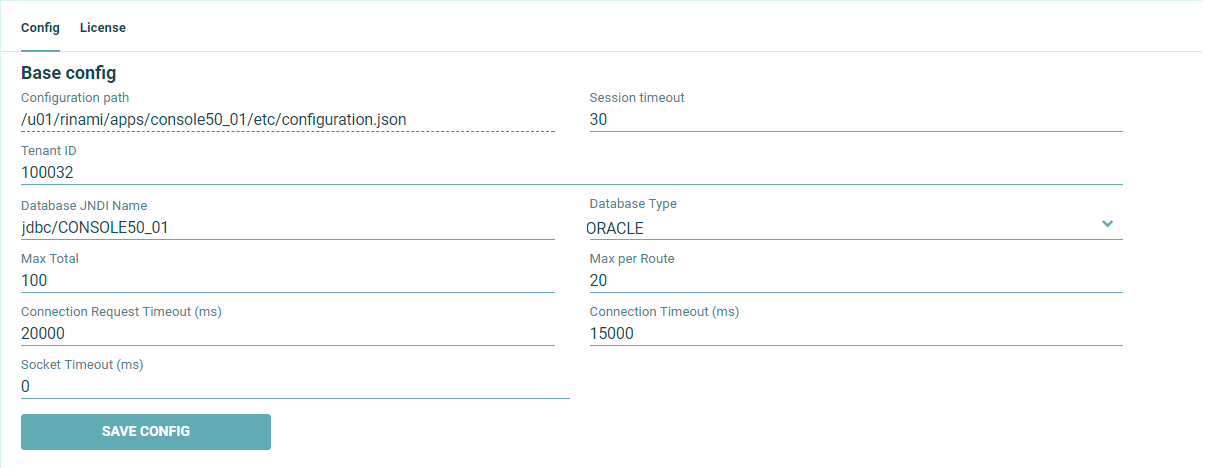
To complete base configuration setup
-
The configuration path is defined automatically. This file will contain the base configuration.
-
The Session Timeout is the time (minutes) that a console user session will be maintained. If the user does not refresh or request a page within the time-out period, the session ends.
-
The Tenant ID is the Rinami's Customer ID you can find this number on https://portal.cantara.cloud
-
Database JNDI Name / Database Type are the configuration details needed by the Cantara Console to be able to connect with the database.
-
Max Total, Max per Route, Connection Request Timeout, Connection Timeout and Socket Timeout are parameters related to the connectivity between Console and other Cantara components: Assur instances, Worker instances or Load Balancers.
-
Click the Save Config button.