
On-Premises Only
To add an Assur Instance
-
Select the Farm node in the navigation panel.
-
Click the 1st Tab displaying the name of your current farm.
-
Click the Add button in the top right of the Assur Instances section
-
The new Assur details will populate based on the template setting for Assur instances.
-
Modify the details as required for the new server instance that has been setup.
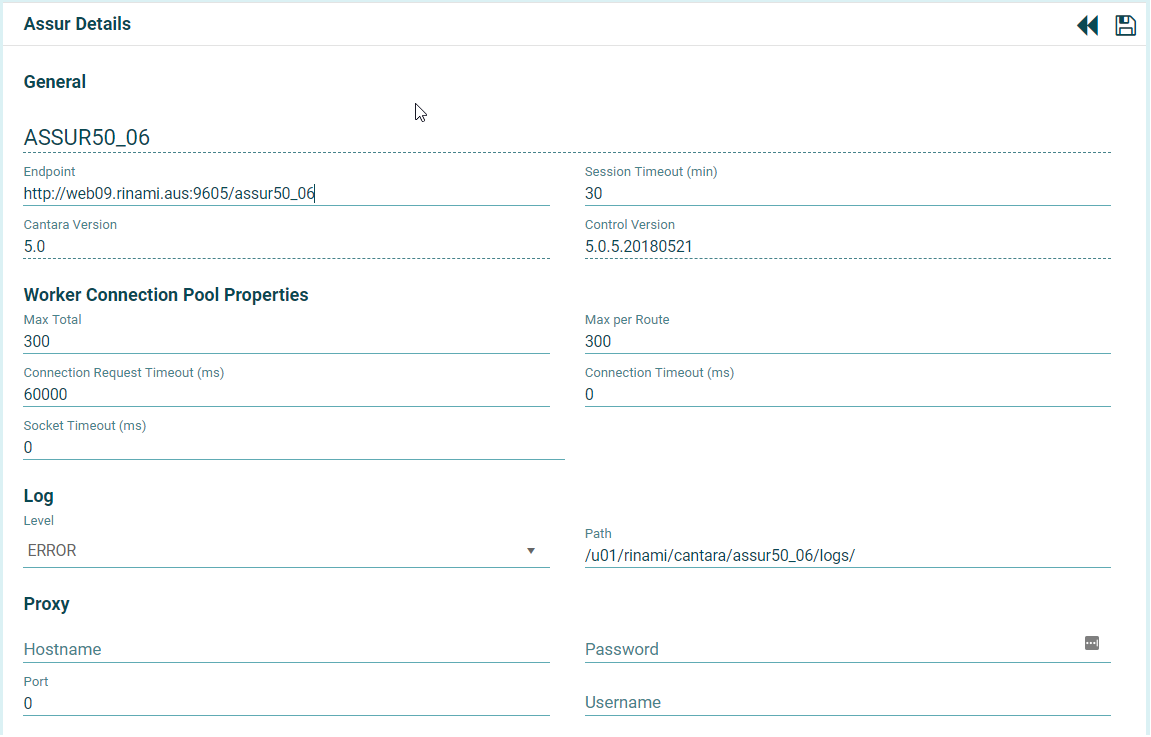
Make changes to the following as necessary:
-
Name: The name you want to assign to the server. The value for this field can be a maximum of 12 characters (no spaces). Valid characters include numbers, letters, and a dash (-).
-
End Point: The URL for the Cantara Assur Server, including the root context
-
Session Timeout: The amount of time in minutes from when a user session expires
-
Cantara Version: This field will be completed automatically when you click save. You can ignore this field.
-
Control Version: This field will be completed automatically when you click save. You can ignore this field.
-
Worker Connection Pool Properties:
-
Max Total: 300
-
Max per Route: 300
-
Connection Request Timeout: 60000
-
Connection Timeout: 0
-
Socket Timeout: 0
-
-
Log Level: The level of information you want to capture. See Log Level Reference.
-
Log Path: Path to the log file
-
Proxy Server: If your internal networking is behind a proxy network, your proxy servers details will need to be added below
-
Hostname: Proxy server hostname
-
Port: Proxy server port
-
Username: Proxy user
-
Password: Proxy user's password
-
6. Press Save.
