
Overview
Before installing the Cantara Agent, confirm that your environment, network access, and security configuration are ready. The agent does not need to be placed on the same local network as JDE, but it must be able to reach the required JDE AIS endpoints and be reachable from Cantara Cloud over HTTPS. This page describes the functional requirements that must be in place before installation. It does not prescribe a specific customer network architecture.
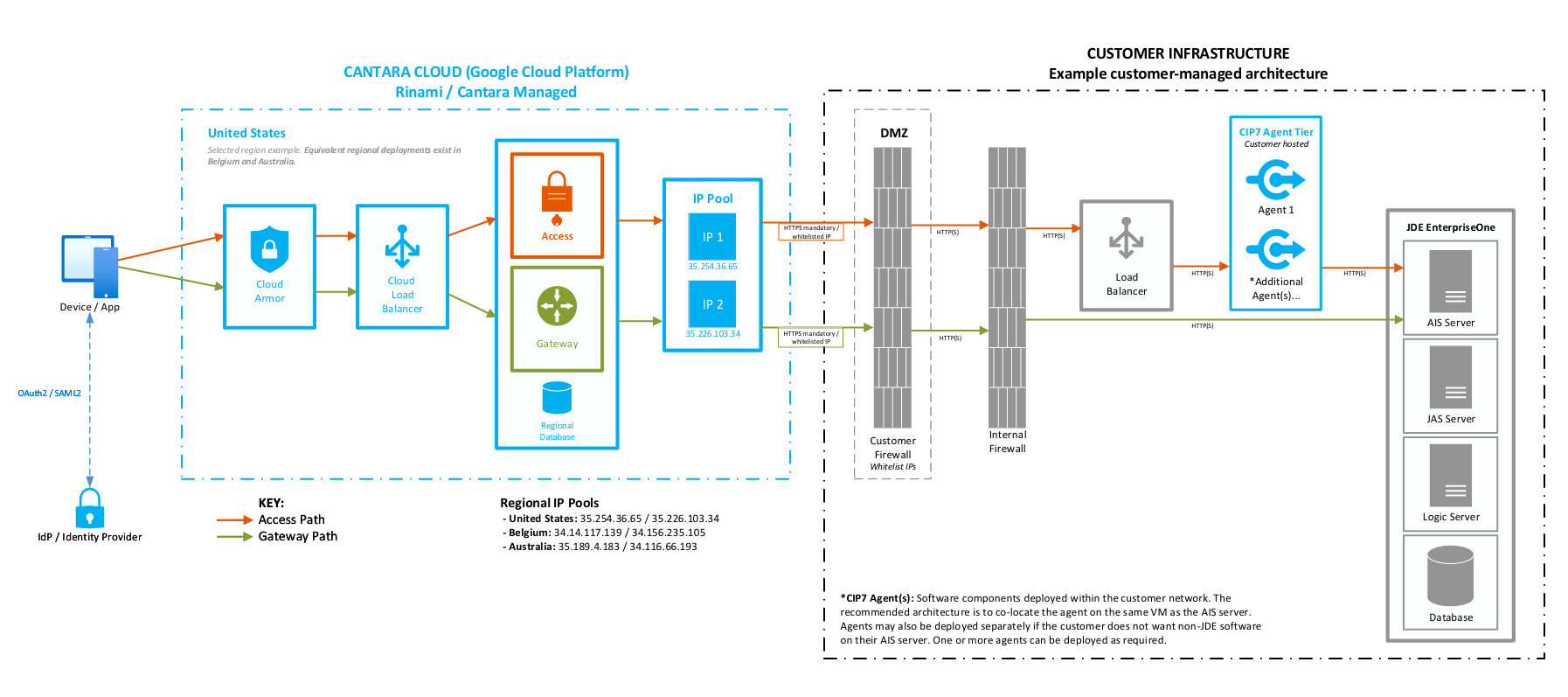
Note: Any diagrams provided are conceptual examples only. They are intended to show the functional network paths required. Customer network teams should place components according to their own security, hosting, firewall, DMZ, load balancing, and naming standards. Optional components shown in examples are not mandatory.
Background
The Cantara Agent is the secure connector between Cantara Cloud and the customer's JD Edwards EnterpriseOne AIS services. The purpose of this preparation page is to help the customer's infrastructure, network, and security teams understand what must be available before the agent is installed. The agent does not require a single prescribed network design; it only needs an approved place to run, HTTPS access from Cantara Cloud, and network access to the required JDE AIS endpoints.
Agent runtime and installation components
This list explains the implementation details that the installation process is based on. It is included to give customers and network or platform teams background on what the Cantara Agent needs in order to run, not to introduce extra manual setup steps. In most cases, the installer handles these components automatically; the customer mainly needs to provide an approved host, network access, and any required security configuration.
-
Application server: The Cantara Agent runs as a web application in Apache Tomcat 11. The installer sets this up as part of the agent installation. If there is a specific Tomcat 11 version you would like to use have that on hand for the installation.
-
Java version: The agent uses JDK 21. The installer can handle this; if you prefer a different JDK, note down its path or JAVA_HOME beforehand.
-
Installer-managed components: The installation script sets up the required Java and Tomcat components for the agent. This means the server does not need to already have Java or Tomcat installed before the Cantara Agent installation starts.
-
AIS-only connectivity: The current CIP7 agent build communicates with JDE through AIS endpoints only. CIP7 does not currently require or support additional JDE client libraries used by earlier agent versions.
Hardware minimum requirements
|
Component |
Minimum requirement |
|---|---|
|
CPU |
Dual Core 2.0 GHz or greater |
|
Available memory |
2 GB RAM as a starting point. Memory tuning may be required after installation based on workload. |
|
Hard disk |
200 MB plus log space |
These figures are retained as baseline planning assumptions only. Final sizing should be validated for the expected workload, log retention requirements, and customer environment.
Network preparation
Complete these checks before you run the Cantara Agent installation script.
-
Cantara Cloud to Agent HTTPS access. Configure the network so Cantara Cloud services can communicate with each Cantara Agent instance over HTTPS at its assigned endpoint.
-
Allow ingress from the Cantara Cloud source IP addresses listed below.
-
Apply the customer's own firewall, DMZ, load balancing, WAF, and security standards as required.
-
Prepare trusted CA certificates for SSL where SSL is terminated by the agent.
-
-
Agent to JDE AIS access. Configure the network so each Cantara Agent instance can communicate with the required JDE AIS endpoints.
-
Allow required outbound traffic from the agent to AIS.
-
Configure hostname resolution for the AIS endpoints.
-
Confirm any internal firewall or load balancer rules required between the agent and AIS.
-
-
Customer endpoints. Confirm that the external endpoint or IP address for each agent instance is activated, reachable, and approved for use by the customer's network team.
Load balancer configuration
Where a load balancer is used, confirm the external endpoint and health check configuration before running the installation. Determine whether session persistence is required based on the AIS server configuration and the customer's operational standards.
-
Confirm the external endpoint that Cantara Cloud will use to reach the agent.
-
Configure health checks so the load balancer can detect whether the agent is available.
-
Determine whether session persistence is required based on the customer environment and supporting systems.
Agent identity and trust
Before installing the agent, confirm the namespace and agent identity details required for the agent to trust Cantara Cloud.
-
Record the agent public key from the Cantara Console for the relevant namespace.
-
Confirm which namespace the agent will be associated with before completing the installation.
-
If multiple namespaces will use the same agent, confirm the intended key and namespace approach before deployment.
SSL/TLS preparation
If your network is not configured for SSL offloading, prepare the SSL certificate details that Rinami will need.
-
Trusted CA SSL certificates covering the agent instance external IP addresses.
-
For each agent instance, the certificate, certificate chain, associated private keys, and credentials. A PKCS#12 keystore is the simplest format, but PEM is also acceptable. These are set up in the server.xml file at <Agent Root Directory/tomcat/conf/server.xml
-
Record the file locations and any required credentials.
Cantara Cloud IP addresses
Allowlist these source IP addresses so Cantara Cloud services can establish HTTPS communication with each Cantara Agent endpoint.
Note: This IP list is included because customers may need concrete values for firewall allowlisting. Confirm the current production allowlist with Rinami before implementing firewall rules.
|
Cantara Cloud service |
IP address |
|---|---|
|
uss1.cantara.cloud |
35.226.81.87 |
|
aps1.cantara.cloud |
35.197.180.236 |
|
aps2.cantara.cloud |
35.197.165.75 |
|
aus1.cantara.cloud |
110.174.237.194 |
Installation options
-
Online installation: The installation script downloads the required components, including Tomcat, JDK, and the Cantara Agent, from the internet.
-
Offline installation: Use this option if the server has restricted internet access. The required components must be pre-loaded onto the target server before running the installation script.
-
Operating system differences: Linux deployments use standard service scripts. Windows deployments are managed as system services.