
Overview
JD Edwards supports multiple ways of representing dates in the Web user interface, which is defined by a System-wide default and optional overrides for individual Users, as defined in their User Profile.
These date formats are defined in the Date Format UDC 00|DF:
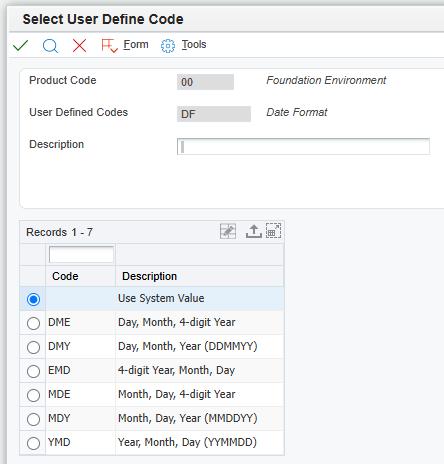
Using dates July 4, 2005 and December 25, 2026 as examples , the date would be presented like this based on the applicable Date Format code:
|
Date Format Code |
July 4, 2005 |
December 25, 2026 |
|
DME |
04/07/2005 |
25/12/2026 |
|
DMY |
04/07/05 |
25/12/26 |
|
EMD |
2005/07/04 |
2026/12/25 |
|
MDE |
07/04/2005 |
12/25/2026 |
|
MDY |
07/04/05 |
12/25/26 |
|
YMD |
05/04/07 |
26/12/25 |
|
ISO** |
2005-07-04 |
2026-12-25 |
** ISO is not a date format from JD Edwards, but is the preferred/default format when working with JSON and dates in Cantara 7 for Queries, Functions and Reports. ISO date format (as date or date + time) is available when working with Orchestration requests and response values.
To avoid ambiguity, especially when users from different countries are working with dates, it is vitally important that Date parameters are provided and interpreted correctly.
Dates for Cantara Services
Services executed via the Application Integration Server (AIS) do not implement consistent behaviour with respect to dates. Orchestrations also provide a lot more control over the format of Date values that are expected in Requests and that are returned in the Orchestration Response. Cantara therefore has different functionality for Query, Function and Report service compared with Orchestration services.
Query, Function and Report services
For Query, Function and Report services Cantara assesses the date values that are provided in the Service Request and transforms them into the appropriate format based on the AIS Request requirements. When dates are returned by AIS in various formats, Cantara then transforms these to the appropriate date format in the response that Cantara provides. This approach allows externally integrated solutions to use the same consistent format for all Query, Function and Report service executions, insulating the external solution from the inconsistencies and complexities of the AIS service date format requirements.
The Date values that are provided to these Cantara Services are assessed in the following order, to validate if the provided value can be interpreted as a date which is used if it is valid:
-
Is the date an ISO date, commencing with 4-digit year and “-“ delimiters, to define a valid YYYY‑MM‑DD formatted date?
-
Is the date a EMD date format date, commencing with 4-digit year and “/“ delimiters, to define a valid YYYY/MM/DD formatted date?
-
Is the date a valid date in the user’s JD Edwards configured Date Format?
The Date values that are returned by these Cantara Services will be in a Date Format that is determined by a Boolean Request input parameter “userDateFormat”.
-
If the “userDateFormat” value is false or is not provided, then Dates in the response will be in ISO format YYYY‑MM‑DD.
-
If the “userDateFormat” value is true, then Dates in the response will be in the User’s JDE Date Format.
NOTE: The evaluation of dates in the Request is not dependent upon the “userDateFormat” parameter value, as this only applies to Dates returned in the Response. The Request will consume dates in ISO, EMD or the user’s JDE date format.
General recommendation for working with Dates for Cantara Query, Function and Report service requests is to either omit or set the “userDateFomat”:false, and then provided dates in ISO YYYY‑MM‑DD format with the response dates also in ISO YYYY‑MM‑DD format. This approach ensures consistency for Request and Response values, with no opportunity for ambiguity.
Orchestrations
Orchestration development involves defining the Orchestration Request and Response data structures, and these definitions include the format for each Date parameter independently.
Cantara 7 passes the provided Orchestration request parameters through to the Orchestration, without modifying the format of any Date values. The expectation is that the development of the solution that is executing the Request is aware of the Orchestration specifications, and therefore the Request data will be in the required date format.
The date formats that can be configured for Orchestration Parameters (Tools 9.2.9.2) are:
-
Date – Milliseconds
-
Date – MM/dd/yyyy
-
Date – dd/MM/yyyy
-
Date – MM/dd/yy
-
Date – dd/MM/yy
-
Date – yyyy/MM/dd
-
Date – yy/MM/dd
-
ISO Date
-
ISO Date Time
NOTE: When the Specifications for an Orchestration are retrieved by Cantara, the date format is not explicitly provided with the specs. Date parameters are just returned as Date with an example based on the current date. If the specs are fetched on a day of the month that matches the month number, like January 1, or February 2 or March 3 etc, then Cantara cannot distinguish Day from Month.
i.e. If today is February 2, 2026, then is the example date 02/02/2006 in Orchestration Date - MM/dd/yyyy format or Orchestration Date - dd/MM/yyyy format? Cantara cannot explicitly determine this, so it has to pick one.
When a conflict like this occurs, Cantara assumes that the date format is US format, and will default with the Orchestration parameter as “Date - MM/dd/yyyy” Orchestration format.
i.e. if today is November 26, 2026, then is the example date 26/11/26 in Orchestration Date - dd/MM/yy format or Orchestration Date – yy/MM/dd format? Again Cantara cannot explicitly determine this, so it has to pick one.
Cantara’s Data Type definition for Orchestration Date parameters should always be reviewed, as the incorrect Type may have been set when the example is ambiguous.