
Purpose
Guide administrators through assigning Security Topics to an existing Security Group in the Cantara Administration Console, including groups provisioned through an Identity Provider (IdP) using SCIM or groups created directly in Cantara. Assigning topics controls the functional areas and permissions available to members of the group.
Before you begin
-
You have access to the Cantara Administration Console and permission to manage Security Groups and Security Topics.
-
A Security Group exists in the system.
Procedure
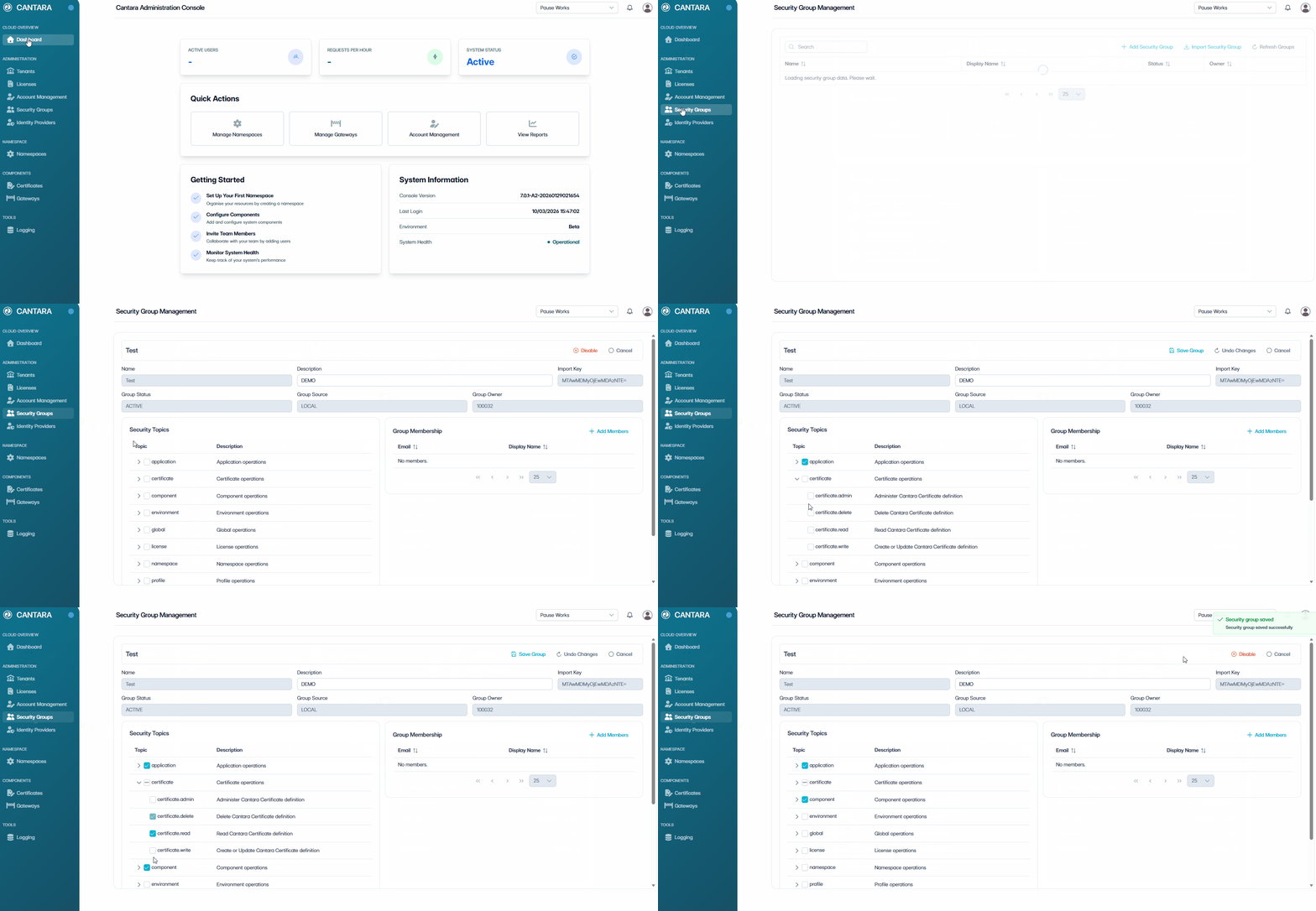
To assign Security Topics to a Security Group:
-
Navigate to Security Groups.
The Security Group Management screen opens, displaying all existing Security Groups.
-
Select the Security Group you want to update.
-
In the Security Topics section assign Security Topics.
Select Security Topics to define access for the group:-
Select a Security Topic to grant full access to that functional area.
-
Alternatively, expand a Security Topic (›) to view Permissions.
-
Select individual Permissions to grant granular access.
-
Repeat for additional Topics as required.
-
-
Select Save Group.
Outcome
The Security Group is updated with the assigned Security Topics. Group members inherit permissions based on the selected topics.
What’s next?
After you have assigned Security Topics, the next step is to create a namespace, see Namespace Setup.