
Development partners and customers can replace icons and logos displayed by a CC6 mobile application, to suit required company branding.
The methods to achieve this are described for each platform below.
Android - Icon and Logo Customisation
Icons
-
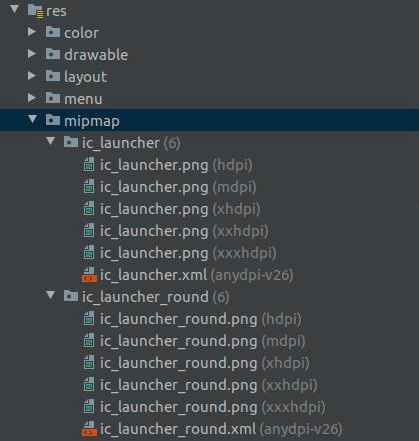
App icons are located in the SDK folder res/mipmap
-
Create your new ic_launcher using the instructions at Android Image Asset Studio.
-
Both the background and foreground of an icon can be customized, and the edges can be configured to be rounded/round bordered/square.
-
Rebuild your CC6 app to incorporate the newly created icons.
Logos
-
App logos are located in the SDK folder res/drawable
-
There are two logos that can be customized: the login and footer
-
For tablet applications, the footer image appears on every page, however on phones it is not displayed (due to the limited screen size).
-
The location and size of the displayed image is fixed.
-
To change the logo images, replace the ic_login.xml and ic_footer.xml files. (Note that the file extension will vary depending on the chosen file format).
iOS - Icon and Logo Customisation
Icons
-
Icons
Logos
-
Logos