
To create a new Android Studio project for Cantara Client
-
Using Android Studio, create a new project for your mobile application.
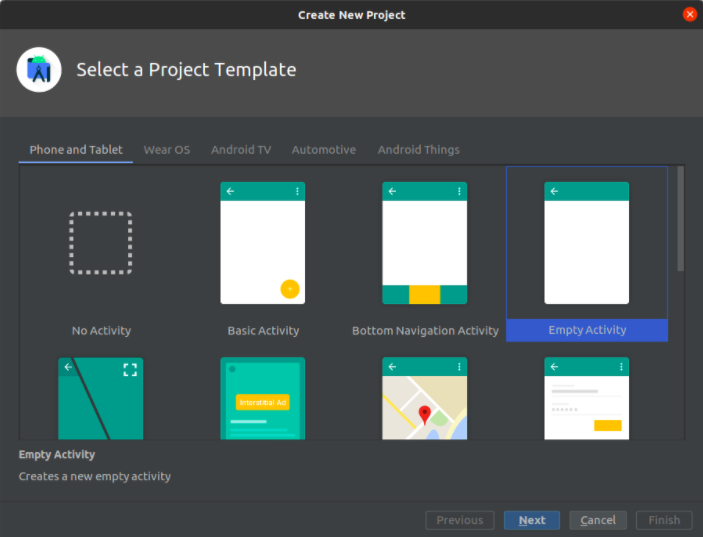
-
Set the project and package names as in the screenshot below
-
Select Kotlin as the language
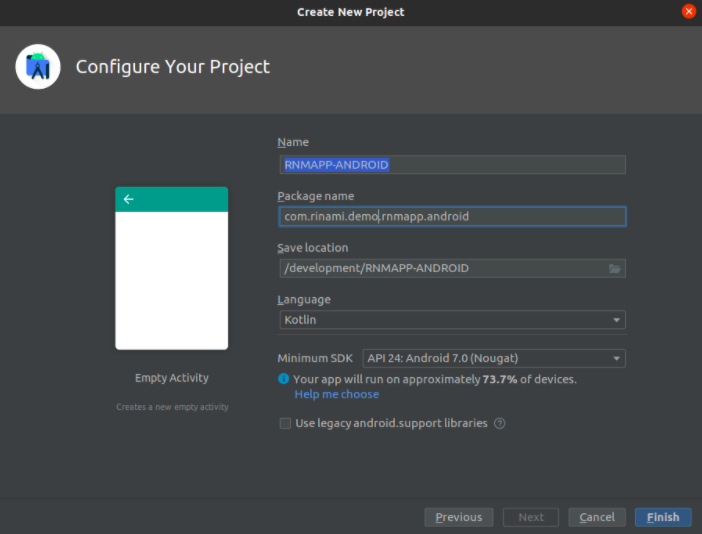
-
Configure the Gradle import settings according to
Gradle Configuration (Android)
.
-
Set up Android Studio preferences according to the Tools and Guidelines.
-
Refer to the procedure Entity Generation (Android) to generate project entity classes and the core data model.
To create the Android Application
-
Create the main and launcher activity named HelloWorldRootActivity and make it a subclass of "RootActivity" from the CC6 library.
-
Provide an empty implementation for the abstract base member function "showHomeActivity()"
-
Create an object file named HelloWorldBoxStoreFactory to set up ObjectBox as the local storage.
object HelloWorldBoxStoreFactory {
const val BOX_STORE_ID: String = "cantara.helloWorld"
private const val TAG: String = "HelloWorldBoxStoreFactory"
private const val MAX_NUM_DB_READERS: Int = 500
private const val MAX_DB_SIZE_KB: Long = (100 * 1024 * 1024)
fun getBoxStore(context: CantaraApplication): BoxStore {
var boxStore = context.boxStores[BOX_STORE_ID]
if (boxStore == null) {
try {
Log.i(TAG, "Generating helloWorld database box store")
boxStore = MyObjectBox.builder().androidContext(context).name(BOX_STORE_ID).
maxSizeInKByte( MAX_DB_SIZE_KB ).maxReaders(MAX_NUM_DB_READERS).build()
context.boxStores[BOX_STORE_ID] = boxStore!!
} catch (exc: Exception) {Log.e(TAG, "Unable to create helloWorld database box store", exc)
throw RuntimeException(exc)
}
}
return boxStore
}
}
-
Create the application class and make it a subclass of "CantaraApplication" from the CC6 library
-
Add the following implementation to the application class:
class HelloWorldApplication : CantaraApplication() {
override fun deleteBoxStores() {
HelloWorldBoxStoreFactory.getBoxStore(this) boxStores.map {
it.value.removeAllObjects()
}
}
}
-
Create your Hello world activity named HelloWorldActivity.
-
In the HelloWorldRootActivity you created earlier, start up the HelloWorldActivity in the member base function "showHomeActivity".
override fun showHomeActivity() {
val homeIntent = Intent(this, HelloWorldActivity::class.java)
startActivityForResult(homeIntent, 0)
}
-
Ensure that you have successfully completed the gradle configuration setup.
-
Run the app and log in.