
The information on this page applies to On-Premises deployments only.
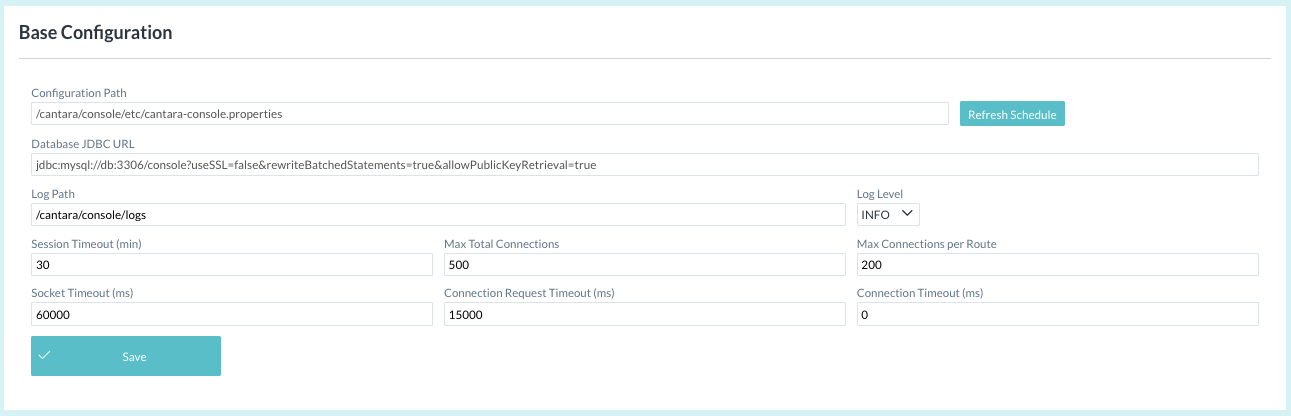
Console base configuration items:
The Refresh Schedule button should only be used when instructed by an authorized Rinami support representative.
-
The Configuration Path is defined automatically. This file will contain the base configuration.
-
Database JDBC URL is needed by the Cantara Console to be able to connect with the database.
-
The Log Path specifies the storage location on the Cantara Server for log files.
-
The Log Level defines the amount of detail included in logging data. Refer to the Log Level Reference for further information.
-
The Session Timeout is the time (in minutes) that a console user session will be maintained. If the user does not refresh or request a page within the time-out period, the session ends.
-
Max Total Connections, Max Connections per Route, Socket Timeout, Connection Request Timeout and Connection Timeout are parameters related to the connectivity between the Administration Console and other Cantara components.
-
Click the Save button after entering required settings.